Aboriginal Legal Service (NSW/ACT) Limited
  • Get help
    • Criminal charges
    • Bail
    • Child protection
    • Family law
    • Housing and renting
    • Family violence and safety
    • Fines
    • Deaths in custody
    • Problems at work
    • Custody Notification Service
    • Crisis support
  • Get help
    • Get help
    • Criminal charges
    • Bail
    • Child protection
    • Family law
    • Housing and renting
    • Family violence and safety
    • Fines
    • Deaths in custody
    • Problems at work
    • Custody Notification Service
    • Crisis support
  • Reforming the system
    • Policy submissions and publications
    • Closing the Gap
    • Justice reinvestment
    • Family Is Culture
  • Reforming the system
    • Reforming the system
    • Policy submissions and publications
    • Closing the Gap
    • Justice reinvestment
    • Family Is Culture
  • News
  • Get involved
    • Take action with us
    • Career opportunities
    • Volunteer
    • Become a monthly donor
  • Get involved
    • Get involved
    • Take action with us
    • Career opportunities
    • Volunteer
    • Become a monthly donor
  • About
    • About us
    • Our history
    • Our strategic plan
    • Annual reports
    • Governance
  • About
    • About
    • About us
    • Our history
    • Our strategic plan
    • Annual reports
    • Governance
  • Contact
    • Get in touch
    • Office locations
    • Feedback and complaints
  • Contact
    • Contact
    • Get in touch
    • Office locations
    • Feedback and complaints
  • DONATE
Print

Tips to browse safely online

Here you'll find some basic tips to protect your privacy and reduce the ability for people to see what you do online.

The 'Close this site' button

Some pages on this website include a 'Close this site' button. Use this button to quickly hide what you are looking at. You might find this helpful if someone comes into the room or looks over your shoulder and you don't want them to know what you've been looking at.

When you use the 'Close this site' button, it immediately closes this website and opens the Google search page in a new window.

You can also quickly close this site by using the ESC button on your computer keyboard. It immediately closes this website and opens the Google search page in a new window.

The 'Close this site' function doesn't delete your browser history. This means that if someone checks your browser history on your computer or mobile device, they will be able to see everything you looked at on our website.

Clear your browsing history regularly

Web browsers keep track of your online activity through your browser history, cookies and caching. This is so you can find websites you've visited before, but it also means other people can see this data.

To protect your privacy, it's a good idea to clear your browsing history regularly. You can choose to delete everything or only some things.

Find out how to clear your browsing history in:

  • Internet Explorer
  • Google Chrome
  • Firefox
  • Safari
  • Safari on iPhones or iPads.

For other browsers and devices, check the provider's website.

Use private browsing

Private browsing is an easy way to hide your browsing habits. If enabled, when you close your browser, all browsing history and stored cookies from future browsing sessions will automatically disappear.

However, the sites you visited during your current browsing session will record your browsing activity. Your internet service provider will also record this information. Any files you download using private browsing won't be deleted, so other people can access them if they use your device.

Find out how to enable private browsing in:

  • Internet Explorer
    • In the 'Tools' menu (the cog icon on top right of the browser window), select 'Safety', then 'InPrivate Browsing'.
  • Google Chrome
  • Firefox
  • Safari
  • Safari on iPhones or iPads.

For other browsers and devices, check the provider's website.

Accounts and passwords

Don't let your browser auto-save your passwords. While the auto-save function may be convenient, it gives anyone who uses your device access to your accounts.

When you are using an account with a password (e.g. your social media or email account), always log out before leaving the website.

Using other computers and devices

If you are worried about someone looking at your internet use, consider using a computer or device that they can't access.

This might be a computer at your local library, your work computer, or a family or friend's device. But again, don't auto-save any passwords and make sure you log out of your accounts when you've finished using the computer.

Creative Commons Attribution 4.0 International (CC BY 4.0)

This advice is from "Tips to browse safely online" by The State of Queensland.
The content is licensed under the CC BY 4.0 license.
© The State of Queensland 2024.
What is this?
To leave this site quickly, click the 'QUICK EXIT' button or press 'ESC' on your keyboard. You will be taken to google.com
Hide Show Quick Exit

How to care for elders and our communities during coronavirus

19th March 2020

The upcoming months are going to be really challenging for our mob 

So we need to look after each other and stay safe from getting sick. 

Here are some things you can do to reduce your risk of coronavirus

  1. Wash your hands often with soap and running water.
  2. Do not to touch your eyes, nose or mouth. Cover your nose and mouth with a tissue when you cough or sneeze. If you don't have a tissue cough or sneeze into your upper sleeve or elbow.
  3. Stay at home if you feel sick. Continue healthy habits: exercise, drink water, get plenty of sleep.
  4. Wearing a face mask is not necessary if you are well.
  5. Buy an alcohol-based hand sanitiser with over 60 per cent alcohol.
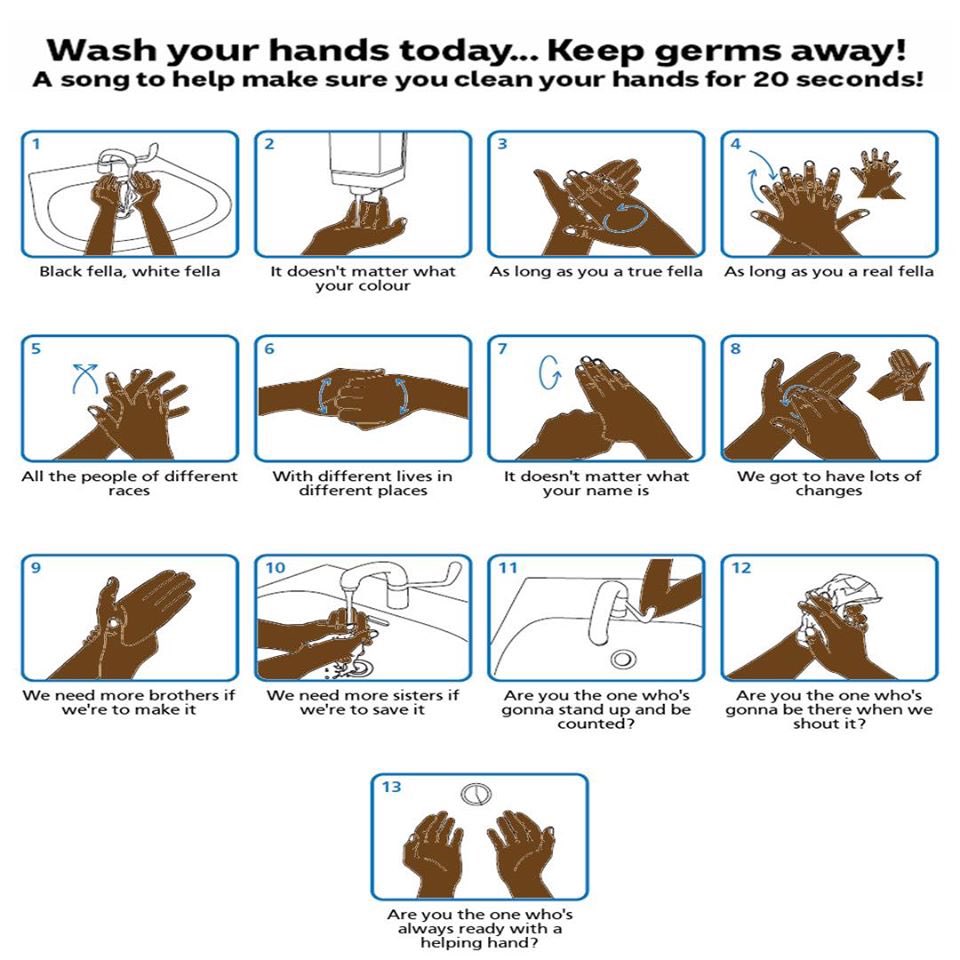
Image result for NITV coronavirus wash hands


What are the symptoms of Coronavirus?

Many people will suffer only mild symptoms, but those most at risk may experience severe symptoms. Based on what we know about coronavirus, those at higher risk of serious infection are:

  • people with immune system issues (such as people who have cancer)
  • Elders
  • Aboriginal and Torres Strait Islander peoples (as we have higher rates of chronic illness)
  • people with chronic medical conditions
  • people in group residential settings
  • people in prison

The most common symptoms include:

  • Fever
  • Breathing difficulties such as breathlessness
  • Cough
  • Sore throat
  • Fatigue or tiredness

How does Coronavirus spread?

Coronavirus spreads through close contact with an infected person; mostly face-to-face or within a household.It cannot jump across a room or be carried for long distances in the air.Close contact means greater than 15 minutes face-to-face or the sharing of a close confined space for more than two hours with a confirmed case.

A close contact could include any person meeting any of the following criteria:

  • living in the same house or building
  • a person who spent two hours or longer in the same room; or
  • face-to-face contact for more than 15 minutes with the case in any other setting not listed above.

What should you do if you think you might have Coronavirus?

If you are concerned about any symptoms you might have:

  • Ring the Coronavirus 24-hour national hotline 1800 020 080, or a GP or emergency department, to arrange for testing and appropriate care.
  • You can also contact your local AMS if you need medical advice.

It is important to monitor any symptoms you have, but not everyone needs to get tested.

Tips for caring for mob

Elders or family and friends who have other health and medical conditions can be at higher risk of  Coronavirus. 

  • Food, medicine and essential items - check what you mob have at home and make sure that if they take regular medication they have extras on hand. Picking up groceries or medicine for them is a helpful way to reduce the changes of them coming into contact with Coronavirus.
  • Create an emergency contact list - have a list of emergency contact numbers handy and a plan for if your mob fall ill so they know what to do if they feel unwell, including contact numbers for local GPs, AMS or medical centre.
  • Stay connected - even though we are keeping physically distant, it's important we stay connected. Pick up the phone and have a yarn with family and friends, and check in regularly on each other during this time.
  • Limit community gatherings - it is better to self-isolate than risk exposing others so be cautious and stay connected in other ways.

Supporting mob living with a disability or chronic illness

Offer extra support to people with a disability at this time. Things like dropping off care packages, assisting with set up in the event of quarantine, organise a support plan.

Check-in and reach out over the phone and internet.

Take extra precautions when visiting - wash your hands and if you are sick, don't risk their health and safety. Call on family and friends who are well and ask them to help out.


More information

Please follow the advice and instructions from the Aboriginal health service in your area. You can also call the Coronavirus Health Information Line on 1800 020 080, which is available 24 hours a day, 7 days a week.

We strongly encourage you to follow advice from NSW Health and ACT Health in relation to COVID-19. The Australian Government Department of Health also issues a daily alert on the latest medical advice and official reports.

Our friends and colleagues at the National Aboriginal Community Controlled Health Organisation, have some really useful information on how we can care for our communities and elders during the Coronavirus outbreak, which you can access here. 


  • Share with your friends!

Get help

Donate to support our work


JOIN US

First name:

Last name:

Email:

Aboriginal Legal Service (NSW/ACT) Limited
  • Get help
  • Reforming the system
  • News
  • Get involved
  • About
  • Contact
Donate
Icon

Call 1800 765 767
for free legal help

We acknowledge the Traditional Owners and Custodians of the lands on which we live, work and travel. We pay our respects to Elders both past and present and acknowledge the contribution and sacrifices our Elders have made to better our community and future. Aboriginal and Torres Strait Islander people should be aware that this site contains names and images of people who have passed away.

Login to Intranet
Website by Principle Co | Built on Nationbuilder | Illustrations by Mumbulla Creative

Privacy Policy  |  Contact Us
© 2025 Aboriginal Legal Service (NSW/ACT) Limited.

Join us

We'll send you exciting updates on our campaigns and how to join our movement for social justice!


First name:

Last name:

Email:

We acknowledge and pay our respects to the Traditional Custodians of the lands on which we live, work, and travel, and their Elders past and present.

Warning: This website contains images and names of Aboriginal and Torres Strait Islander people who have passed away.